

Configuration: 2558 Analog Input Module PowerPoint PPT Presentation
Title: Configuration: 2558 Analog Input Module
1
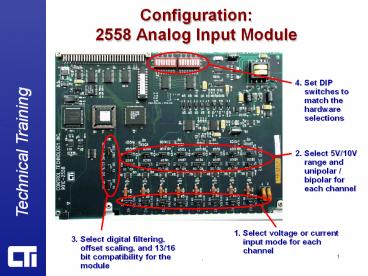
Configuration2558 Analog Input Module
4. Set DIP switches to match the hardware
selections
2. Select 5V/10V range and unipolar / bipolar for
each channel
1. Select voltage or current input mode for each
channel
3. Select digital filtering, offset scaling, and
13/16 bit compatibility for the module
2
Configuration2558 Analog Input Module
Select voltage or 20mA for each channel
Select 10V or 5V range for each channel
Select bipolar (/-) or unipolar ( only) for
each channel
3
Configuration2558 Analog Input Module
Select 4-20ma offset for the module
Select compatibility mode (13bit Siemens 6108)
Select digital filtering for the module
Note These settings affect all channels
4
Configuration2558 Analog Input Module
Configure DIP switches to match range and
polarity hardware setting on each channel 00
unipolar 5V 01 unipolar 10V 10 bipolar 5V 11
bipolar 10V
Recommended

