

General Problem Solving Methodology PowerPoint PPT Presentation
1 / 34
Title: General Problem Solving Methodology
1
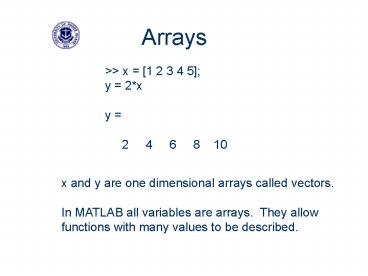
Arrays
gtgt x 1 2 3 4 5 y 2x y 2 4
6 8 10
x and y are one dimensional arrays called
vectors. In MATLAB all variables are arrays.
They allow functions with many values to be
described.
2
EGR 106 Week 2 Arrays
- Definition, size, and terminology
- Construction methods
- Addressing and sub-arrays
- Some useful functions for arrays
- Character arrays
- Arrays chapter 2, pages 33 - 50
- Scripts chapter 4, pages 85 - 93
3
Recall from Last Week
- Variables placeholders for numerical data
- equal sign is an assignment operator
- c 7.5 c c 1
- naming restrictions (not pi, etc. )
- can be complex valued ( x 3 i 7 )
- Basic math on numbers and variables
- Precedence ( ) / -
4
- Names for special sizes
- scalar 1 x 1 array 4 or 4
- row vector 1 x C array
- 9 7 5 4 2 is a 1 x 5
row vector - column vector R x 1 array
- is a 3 x 1 column vector
5
Uniformly Spaced Vectors
- Colon operator
- first increment maximum
- yields a row vector of equally spaced values
- examples
- 0 2 10 0 2 4 6 8 10
- 1 5 1 2 3 4 5
- 7 -2 -3 7 5 3 1 -1 -3
- 1 2 8 1 3 5 7
- default for increment is 1
Note does not hit 8!!
6
Arrays
- Fundamental data unit in Matlab
- all variables are stored as arrays
- Data values organized into rows and columns
- numeric or alphanumeric entries
7
Array Construction
- Direct specification
- Name followed by an equal sign ( ),
just like variables - List values within a pair of brackets ( )
- Enter data one row at a time
- left to right, top to bottom order
- space or comma between the values
- rows separated by semicolons or the enter key
8
- Size or dimension of an array
- number of rows and columns
- written as R by C or R x C
- where R number of rows
- C number of columns
- e.g.
- yield is 3 by 4
- test is 1 by 5
9
Building Arrays
- gtgta 1 2 3 4 5 6 7 8 9 10 11 12
- gtgta 13 46 79 1012
10
- Can use simple math operations as well as
numerics as the entries - Note the common format of all entries in the
response (exp(1) e 2.71828, log10(100)
2, 2-12 0.00024414) - MATLAB scales the exponent to the largest entry !!
11
- This scaling is sometimes deceptive
Not really zero
Really zero
12
- Concatenation gluing arrays together
- if a 1 2 3 b 4
5 6 - Attaching left to right use a comma
- a, b
- Attaching top to bottom use a semicolon
- a b
comma
semicolon
13
- Note that sizes must match for this to work
- if a 1 2 3
- then
- a, b ?? a b ??
- Size needs for concatenation
- of rows the same for side by side (comma)
- of columns the same for top to bottom
(semicolon)
14
Addressing and Sub-Arrays
- How to indicate a particular element within an
array - use parentheses after the array name
- list desired row, comma, desired column
- e.g.
yield(2,4)
15
How About More than One Entry?
- Can specify a rectangular sub-array
- again, use parenthesis after the array name
- list desired rows, comma, desired columns
- as a vector, typically in brackets
- e.g.
yield(1 2,3 4)
16
- Used to read a value from an array (right hand
side of )
17
Addressing Errors
18
Things that do Work
Single indexing of matrices counts down columns,
starting at the top left
19
Some Useful Array Operators
- Transpose (single quote symbol ' )
- switches rows and columns
20
Useful Array Functions
- length(A) is the number of elements in the vector
A - m n size(A), where A is a matrix with m rows
and n columns - ones(n) is an n x n matrix of ones
- zeros(n) is an n x n matrix of zeros
21
CHANGE THE MATRIX
- sample
- 1 2 3 4
- 5 6 7 8
- 9 10 11 12
- 13 14 15 16
- gtgt sample(1,3)9
- sample
- 1 2 9 4
- 5 6 7 8
- 9 10 11 12
- 13 14 15 16
22
- Used to read a sub-array ( rhs of )
Note scalar row choice does not need brackets!
23
Character Arrays
- Rows of the array are strings of alphanumeric
characters, one array entry per character - Enter using a single quotation mark ( ' ) at each
end
24
Assigning values with too large an index just
grows the array
25
Scalars work for sub-array replacement they
just scale up to the right size
26
Replacing with a null matrix is the same as
deleting but it only works for entire rows or
columns
27
Rules of the road for arrays Symbols to
use brackets to glue elements together to make
an array (left to right or top to bottom) comma
(or space) and semicolon (or enter) for
separating column/row elements parentheses after
the array name for addressing Be careful to match
array sizes Remember rows first, then columns
in addressing
28
Scripts Simple Programs
- So far, commands have been typed in the command
window - Executed by pressing enter
- Edited using the arrow keys or the history
window
29
Script (m-file) Concept
- A file containing Matlab commands
- Can be re-executed
- Is easily changed/modified or e-mailed to someone
- Commands are executed one by one sequentially
- File is executed by typing its name (without .m)
- Results appear in the command window (or use )
- Can be created using any text editor
- .m extension
- Listed in Current Directory window
30
Sample Scripts
31
(No Transcript)
32
DIFFUSION
- Diffusion is the movement of matter driven by
- chemical and thermal processes such as
- concentration gradients and heating. Both are
- needed as it is an activation controlled
- process.
- Atoms will diffuse down a concentration gradient
- provided they have overcome the
- activation energy needed for the process.
- Copper atoms will diffuse into the
- Nickel until an equal concentration is
- Achieved. Remember that Cu-Ni system
- Is one of complete solid solubility.
Cu
Position
33
Practical Example
Decarburization at 1200F after quench crack in
material. The crack left enough open surface For
the carbon to diffuse out and leave a ferrite
layer either side of the crack.
34
ARRAYS FOR DIFFUSION
- DIFFUSION RATE AGAINST TEMPERATURE
- STRENGTH AGAINST CARBON CONTENT
Recommended

