

Spatial Entity Simulator PowerPoint PPT Presentation
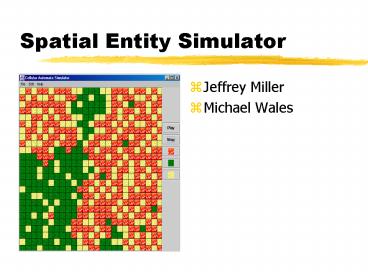
Title: Spatial Entity Simulator
1
Spatial Entity Simulator
- Jeffrey Miller
- Michael Wales
2
Topics
- Brief overview of Cellular Automata (CA) concepts
- High level design of simulator
- Demonstration
- Lessons learned
3
Conways Game of Life
- A living cell will continue to live if 2 or 3
neighbors are alive - A dead cell will become alive if it has 3 living
neighbors
4
General Requirements
- Create a general use simulator
- User friendly initial state editor
- Needs to be programmable
- Transition properties edited through a
user-friendly GUI - Load and save files
5
Program Design
- Application divided into two main parts
- Jeff created the editor on the left
- Michael created the properties window on the
right - Both parts were integrated late in the design
cycle
6
Implementing the Editing GUI
- Buttons represent states
- Click-able cells
- Dragging cursor selects large areas
- Clicking a cell selects
- Each cell is a class
7
Loading and Saving Files
- Serialization
- Loads image file
- Loads transition rules
8
Running a Simulation
- Threaded
- Traverses the screen
- Determines new state
- Repaints grid
9
Next State Determination
- What will cell (x,y) go to?
- Starts with state of least precedence
- Ask the state if it would go to cell location (x,
y) - Ask each state above it
- The state with highest precedence over-rules
others
10
Editing Transition Rules
- Each rule is programmable
- Each state can have any combination of rules
controlling it
11
Programmable rules
- String Description "Random"
- String Param1Description "Percentage"
- String Param2Description "Trails"
- boolean willCellTrans ( CellMap Map, int X, int
Y, int SN) - if ( Param2Value 1)
- if (Map.getStateNum( X, Y) SN)
- return true
- if (RandomNum(100) gt Param1Value)
- return false
- else
- return true
12
What about conflicts?
- Trailer is off in Movement
- Trailer is on in Random
- Any rule that evaluates true will have precedence
13
Design Issues
- Under estimated complexity of the product
- Learning how to use JAVA to build a GUI
- Interfacing modules
14
Difficulties with properties editor
- Each state has a full set of transition rules
- OK button will update all states
- Cancel button wont update any states
- Must remember info from before and after!
15
Difficulties with editor
- Adding a new state
- GUI must update
- Map must contain data about the new state
16
Interfacing of two GUIs
- lt- Editor Module
- lt- Properties Window
17
Lessons learned
- Testing
- Difficult
- Time consuming
18
Lessons learned
- High-Level and Detailed-Design should be created
early - 1st design 6 classes
- Final design has 28 classes
19
Software quality
- User inputs checked
- Error dialog boxes
- Try to handle all exceptions
- Extensive testing
20
Conclusions
- Product meets general requirements
- Difficulties were resolved
- Lessons learned will be applied to future
projects - Software design is very time consuming
Recommended

