

SAM FINES PowerPoint PPT Presentation
1 / 11
Title: SAM FINES
1
SAM FINES
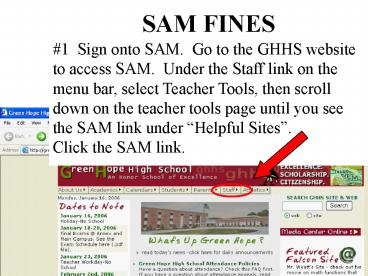
1 Sign onto SAM. Go to the GHHS website to
access SAM. Under the Staff link on the menu
bar, select Teacher Tools, then scroll down on
the teacher tools page until you see the SAM link
under Helpful Sites.Click the SAM link.
2
Sign-In Page
Sign into Sam using your NCWISE sign- in. The
password and username are the same for both
NCWISE and SAM.
3
Introduction PageSelect Fines/Textbooks located
on the menu bar.
4
Under the Fines/Fees heading, select Add
Fine/Fee.
5
(No Transcript)
6
Select the name of the student that you wish to
issue a fine for. A convenient drop down menu
will list all GHHS students.
7
Enter fine type.
8
Enter a fine amount.
9
It is necessary to provide a description. All
teachers will enter their name and the class the
student is taken. For example, Clayton-English.
10
Click the Add Fine Record Button to save the
fine
11
(No Transcript)
Recommended

