

Volvo EC220D L EC220DL Excavator Service Repair Manual Instant Download PowerPoint PPT Presentation
Title: Volvo EC220D L EC220DL Excavator Service Repair Manual Instant Download
1
Service Information
Document Title Component locations Function Group 200 Information Type Service Information Date 2014/6/12
Profile EXC, EC220D L GB Profile EXC, EC220D L GB Profile EXC, EC220D L GB Profile EXC, EC220D L GB
Component locations
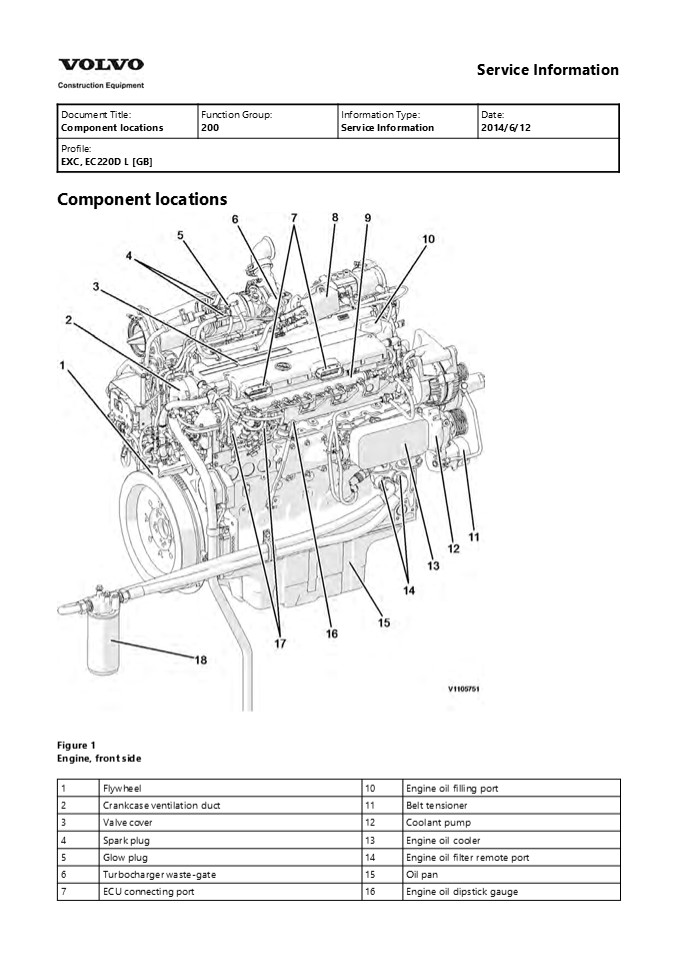
Figure 1 Engine, front side
1 Flywheel 10 Engine oil filling port
2 Crankcase ventilation duct 11 Belt tensioner
3 Valve cover 12 Coolant pump
4 Spark plug 13 Engine oil cooler
5 Glow plug 14 Engine oil filter remote port
6 Turbocharger waste-gate 15 Oil pan
7 ECU connecting port 16 Engine oil dipstick gauge
2
8 Spark plug control unit 17 High pressure fuel pump
9 Common rail 18 Engine oil filter
Figure 2 Engine, back side
19 Fuel feed pump 25 Partial flow-burner
20 Alternator 26 EGR actuator
21 Thermostat housing 27 Starter motor
22 Pre-heating coil housing 28 Electric air pump
23 Turbocharger 29 Engine oil level sensor
24 EGR cooler
3
Service Information
Document Title E-ECU, MID 128, changing non-programmed ECU Function Group 200 Information Type Service Information Date 2014/6/12
Profile EXC, EC220D L GB Profile EXC, EC220D L GB Profile EXC, EC220D L GB Profile EXC, EC220D L GB
- CU, MID 128, changing non-programmed ECU
- Op nbr 200-068
- VCADS Pro VCADS Pro Service Tool 88890180
Interface - 88890027 Cable
- Park the machine in the service position A, see
091 Service positions. - Turn OFF the battery disconnect switch.
- Figure 1
- Open the side door on the left side of the
machine. - Download software to VCADS Pro computer for
target machine. - Connect the VCADS Pro computer to the machine,
and perform the operation '28423-7 MID 128
control unit, programming'. - When VCADS Pro 'MID 128 ECU, programming' window
appears, follow the instructions for replacing
E-ECU. - Disconnect the wiring harness connectors from
E-ECU and remove 2 screws fixing the clamps.
4
https//www.ebooklibonline.com Hello dear
friend! Thank you very much for reading. Enter
the link into your browser. The full manual is
available for immediate download. https//www.eb
ooklibonline.com
5
- Figure 2
- Connector
- E-ECU
- Screw
- NOTE!
- Pull up the locking device to disconnect the
connector. - Remove 4 screws fixing the E-ECU.
- Install new E-ECU, and tighten 4 screws.
- Connect the wiring harness connectors to the
E-ECU and tighten 2 screws fixing the clamps. - After replacing E-ECU, press OK button of VCADS
Pro operation '28423-7 MID 128 control unit,
programming'. Now VCADS Pro starts the
programming of software and parameters to the new
E-ECU. - NOTE!
- If not able to read out the parameters with the
program operation, the VCADS Pro operation
254388 Nox sensor, age compensation, reset
has to be performed.
6
Service Information
Document Title E-ECU, MID 128, changing pre-programmed ECU Function Group 200 Information Type Service Information Date 2014/6/12
Profile EXC, EC220D L GB Profile EXC, EC220D L GB Profile EXC, EC220D L GB Profile EXC, EC220D L GB
- CU, MID 128, changing pre-programmed ECU
- Op nbr 200-070
- VCADS Pro VCADS Pro Service Tool 88890180
Interface - 88890027 Cable
- Park the machine in the service position A, see
091 Service positions. - Turn OFF the battery disconnect switch.
- Figure 1
- Open the side doors on the left side of the
machine. - Connect VCADS Pro computer to the machine, and
perform the operation '17030-3 Parameter,
programming'. - Use the function 'save all parameters to job
card'. - Disconnect the wiring harness connectors from
E-ECU and remove 2 screws fixing the clamps.
7
- Figure 2
- Connector
- E-ECU
- Screw
- NOTE!
- Pull up the locking device to disconnect the
connector. - Remove 4 screws fixing the E-ECU.
- Install new E-ECU, and tighten 4 screws fixing
the E-ECU. - Connect the wiring harness connectors to the
E-ECU and tighten 2 screws fixing the clamps. - Connect VCADS Pro computer to the machine, and
perform the operation 17030-3 Parameter,
programming'. Now the customer parameters are
changed according to the job card saved at step
2. - Perform VCADS Pro operation 254388 Nox sensor,
age compensation, reset.
8
Service Information
Document Title VCADS Pro, Operations Function Group 200 Information Type Service Information Date 2014/6/12
Profile EXC, EC220D L GB Profile EXC, EC220D L GB Profile EXC, EC220D L GB Profile EXC, EC220D L GB
VCADS Pro, Operations The following VCADS Pro
operations are available for function group 2.
Operations used when changing or working on
components are mandatory. Tests
Operation Application
20046-3 Read out engine information The operation is used to read out the engine emission and engine certificate information when requested by the customer or other interested parties.
21006-3 Cylinder compression, test Used when there is a suspicion of fault and/or at abnormal values/readings. This test indicates if there is any deviation in compression in any cylinder in relation to the other cylinders. As a first check this operation is both easy and fast to perform instead of a real compression test.
23017-3 Feed pressure, inspection Used when there is a suspicion of fault and/or at abnormal values/readings.
23712-3 Injectors shut off, manual Used when there is a suspicion of fault and/or at abnormal values/readings.
23777-3 Fuel system, check Check the fuel system on common rail engines. In this test, it is possible to check the engine at different running condition.
25410-3 Air pump exhaust aftertreatment, test Used when there is a suspicion of fault and/or at abnormal values/readings. Air for combustion and HC injection
25411-3 Burner exhaust aftertreatment, test Used when there is a suspicion of fault and/or at abnormal values/readings.
25433-3 Fuel system exhaust aftertreatment, bleeding Used to remove any air in the EATS system.
25438-3, Nox sensor, age compensation, reset Used to reset the age compensation value stored in the MID 128, E-ECU. A reset is needed either when the E-ECU is replaced and there is no possibility to read out the values from the old E-ECU or when a new Nox sensor is mounted.
25440-3 Fuel pressure, exhaust aftertreatment system, test The test checks The fuel supply to the shut off valve, pressure and temperature The pressure after MV1 to the HC injector The pressure after MV2 to the burner
25456-3 Exhaust aftertreatment diagnostics Perform a simple check of the included components in the exhaust aftertreatement system.
25457-3 Diesel Particulate Filter Service Regeneration Used when the soot load level becomes higher than what can be removed by the normal regeneration process. See 254 Exhaust Aftertreatment System, description
25460-3 Reset soot and ash load When the diesel particulate filter has been changed, the soot load and the ash load must be reset. The reset is needed to indicate to the system that the filter has been cleaned. The soot load and ash load must only be reset if a clean filter has been installed.
27502-2 Engine speed control, test Used when there is a suspicion of fault and/or at abnormal values/readings.
28407-3 Sensor values, monitoring Used when there is a suspicion of fault and/or at abnormal values/readings.
28420-3 Flywheel and camshaft signal, test Used when there is suspicious of faulty signals or faulty connected sensor.
Programming
9
Operation Application
25801-3 MID 233 Control unit, programming When changing ACM or only reprogramming. See 254 ACM, replacing, non-programmed
25802-3 MID 233 Control unit, campaign
28423-3 MID 128 ECU, programming When changing ECU or only reprogramming. See 200 E-ECU, MID 128, changing non-programmed ECU
28422-3 MID 128 ECU, campaign
10
Service Information
Document Title Engine characteristic curve Function Group 210 Information Type Service Information Date 2014/6/12
Profile EXC, EC220D L GB Profile EXC, EC220D L GB Profile EXC, EC220D L GB Profile EXC, EC220D L GB
Engine characteristic curve
Figure 1 Engine characteristic curve, ISO 14396
Gross power
P Output power
rpm Engine speed
T Torque
be Fuel consumption
11
Service Information
Document Title Engine, removing Function Group 210 Information Type Service Information Date 2014/6/12
Profile EXC, EC220D L GB Profile EXC, EC220D L GB Profile EXC, EC220D L GB Profile EXC, EC220D L GB
Engine, removing Op nbr 210-070
WARNING
Risk of burns - stop the diesel engine and allow
it to cool down before starting any work.
WARNING
- Removal of residual pressure from the circuit
must be done prior to any maintenance. - NOTE!
- Cable ties and clamps that secure hoses and
electrical wiring must be removed and then
replaced when installing components. - NOTE!
- Disconnected hoses, lines and connections must be
plugged. Oil that drains from hoses, lines and
connections should be collected in a container. - Place the machine in the service position B.
See091 Service positions - Turn off the battery disconnect switch.
- Drain the coolant in a collection container. See
261 Coolant, changing. - Remove the DPF hood and the radiator hood.
- Figure 1
- DPF hood
- Engine hood
- Radiator hood
- 5. Remove the engine room cowl frame with the
engine hood using a lifting device.
12
Figure 2 6. Remove the clamps and the charge
air cooler tubes.
- Figure 3
- Charge air cooler tube (Outlet)
- Charge air cooler tube (Inlet)
- Screw
- Clamp
- 7. Remove the clamp and disconnect the exhaust
pipe.
Figure 4 1. Exhaust flexible tube
13
- Exhaust pipe
- Clamp
- Burner
- 8. Remove the radiator under cover and the
engine room under covers.
- Figure 5
- Radiator under cover
- Engine room under cover
- 9. Remove the clamps and disconnect the radiator
hoses.
- Figure 6
- Clamp
- Radiator hose (Inlet)
- Radiator hose (Outlet)
- 10. Remove the clamps and disconnect the
connector.
14
- Figure 7
- Connector
- Clamp
- 11. Remove the cooling fan guard.
- Figure 8
- Screw
- Cooling fan guard
- 12. Remove the mounting screws and lay down the
cooling fan inside the radiator shroud safely.
Figure 9
15
- Cooling fan
- Screw
- Remove the main pump. See 913 Hydraulic pump,
replacing - Disconnect the hose on the top side of the
expansion tank.
- Figure 10
- Expansion tank
- Clamp
- Hose
- 15. Disconnect wire harness connector and the
hoses.
- Figure 11
- Wire harness connector
- Hose
- Hose
- 16. Remove the screws and the cover plate with
the expansion tank.
16
- Figure 12
- Screw
- Cover
- 17. Disconnect the engine block heater
wire-harness and the cab heater hose.
- Figure 13
- Engine block heater wire-harness (optional)
- Cab heater hose (supply)
- 18. Disconnect the fuel line hoses (4 pcs) and
remove the bracket - NOTE!
- Ports must be plugged after disassembling hoses.
Figure 14
17
- Fuel hose
- Bracket
- 19. Remove the air conditioner compressor belt.
Figure 15 20. Disconnect the wire harness
connector, remove the compressor and lay it down
on the frame.
WARNING
Do not disconnect or loosen connections for the
air conditioning unit (AC). Risk of gas leakage.
- Figure 16
- Wire harness connector
- Air conditioner compressor
- 21. Disconnect the oil hoses connected to the
P.T.O gear pump if installed.
18
- Figure 17
- P.T.O (Power Take Off) gear pump (optional)
- Hose
- 22. Disconnect the engine oil remote hoses.
Figure 18 1. Engine oil remote hose 23. Remove
the air inlet hose.
- Figure 19
- Clamp
- Air inlet hose
19
24. Remove the hose connected to the electric air
pump.
- Figure 20
- Air hose
- Electric air pump
- 25. Disconnect the starter motor wire harness.
Figure 21 1. Starter motor wire harness 26.
Disconnect the junction box connector.
Figure 22 1. Junction box connector
20
Suggest If the above button click is invalid.
Please download this document first, and then
click the above link to download the complete
manual. Thank you so much for reading
21
27. Remove the four mounting screws.
Figure 23 28. Lift the engine just a little
using a lifting device, and after confirming
safety around, lift it up and out slowly to the
work stand.
Figure 24
22
https//www.ebooklibonline.com Hello dear
friend! Thank you very much for reading. Enter
the link into your browser. The full manual is
available for immediate download. https//www.eb
ooklibonline.com
Recommended

