

Get All Indian Companies Database with Key Executives Contact Details. Enquire PowerPoint PPT Presentation
Title: Get All Indian Companies Database with Key Executives Contact Details. Enquire
1
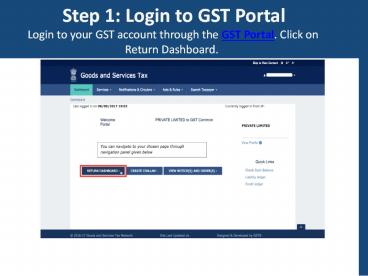
Step 1 Login to GST Portal Login to your GST
account through the GST Portal. Click on Return
Dashboard.
2
Step 2 Select the month of filing. GSTR-3B
return must be filed only for the months of March
and April. Hence, Select GST Return Month and
Click Search drop down and click on continue
3
Step 3 Select prepare GSTR-3B return Click on
prepare online in the section titled Monthly
Return GSTR3B. .
4
Step 4 Ensure that all fields are nil in the
return If all fields are nil in the GSTR3B
return summary, click on save. You can save the
GSTR3B returns multiple times during the
preparation time to save your progress.
5
Step 5 Preview and Submit GSTR3B ReturnOnce the
GSTR3B return is prepared and saved, click on
Preview and Submit GSTR3B.
6
Step 6 Accept the return summary Once the
GSTR3B return is submitted, a window will ask for
final confirmation. Click on confirm and submit
to file the GSTR3B return. Once the button is
clicked, the taxpayer will not be able to change
any of the information submitted.
7
Step 7 Digitally sign the GSTR3B return Once
the GSTR3B return is submitted, click on the
agree check box and digitally sign the GSTR3B
return to complete the nil GST return filing.
Recommended

