

JEditorPane PowerPoint PPT Presentation
1 / 16
Title: JEditorPane
1
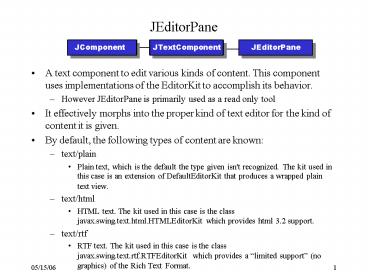
JEditorPane
JComponent
JTextComponent
JEditorPane
- A text component to edit various kinds of
content. This component uses implementations of
the EditorKit to accomplish its behavior. - However JEditorPane is primarily used as a read
only tool - It effectively morphs into the proper kind of
text editor for the kind of content it is given. - By default, the following types of content are
known - text/plain
- Plain text, which is the default the type given
isn't recognized. The kit used in this case is an
extension of DefaultEditorKit that produces a
wrapped plain text view. - text/html
- HTML text. The kit used in this case is the class
javax.swing.text.html.HTMLEditorKit which
provides html 3.2 support. - text/rtf
- RTF text. The kit used in this case is the class
javax.swing.text.rtf.RTFEditorKit which provides
a limited support (no graphics) of the Rich
Text Format.
2
JEditorPane Continued
- Within each JEditorPane instance is a class
called EditorKit, which controls the policy of a
specific MIME content type. - For example, a pane capable of viewing HTML is
quite straightforward - Using a HyperLinkListener, you can process
hyperlinks within the document - The html EditorKit will generate hyperlink events
if the JEditorPane is not editable (i.e.
JEditorPane.setEditable(false) has been called).
- Constructors
- JEditorPane()
- JEditorPane(URL initialPage)
- JEditorPane(String url)
- To date, the default EditorKit is for HTML
- There is an RTFEditorKit, but it only supports
text, not graphics - JEditorPane is not a scrolling windowit needs to
be placed within a JScrollPane for scrolling
3
More on JEditorPane
- Constructors
- public JEditorPane()
- public JEditorPane(String url) throws IOException
- public JEditorPane(URL url) throws IOException
- Significant Methods
- public void setPage(String url)
- public void setPage(URL url)
- HTML Issues
- JEditorPane will not be able to properly
represent the content of all HTML pages - Best to use this control to view embedded
documentation, rather than as a general purpose
web browser.
4
RTFEditorKit
- Do not use the read(Reader in, Document doc, int
pos) method of the Editor kit in a JTextComponent
for RTF files - Instead use the read(InputStream in, Document
doc, int pos) method. - RTF is actually an 8 bit format that should not
be passed through a decoder to turn it into
Unicode - The default action of placing 8-bit bytes into
16-bit Java characters is the only appropriate
thing to do - Any other method will probably corrupt the data.
5
Code Example, MyRTFEditor.java
6
JEditorPane Events
- The HTMLEditorKit detects the selection of
hyperlink - A HyperlinkEvent is generated when the link is
activated - As well as the usual source, this event contains
a type field and the URL of the target of the
link. - You can extract these values using the following
HyperlinkEvent methods - public EventType getEventType()
- public URL getURL()
- If you want to follow the link, you have to
register a HyperlinkListener and change to the
new page yourself. - Public interface HyperlinkListener
- public void hyperlinkUpdate(HyperlinkEvent
evt) - In JDK 1.4, the HyperlinkEvent contains an offset
into the document to allow the developer to
determine the position in the doucment a
HyperlinkEvent represents.
7
Code Example, MyEditorPane.java
8
Comments on Hyperlink events
- In the example just presented, the PageLoader
class caused an additional instance of the
PageLoader thread to be invokedLater() - For the JEditorPane.setPage() method
- This method may load either synchronously or
asynchronously depending upon the document
returned by the EditorKit. If the Document is of
type AbstractDocument and has a value returned by
AbstractDocument.getAsynchronousLoadPriority that
is greater than or equal to zero, the page will
be loaded on a seperate thread using that
priority. - If the document is loaded asynchronously, the
document will be installed into the editor
immediately using a call to setDocument which
will fire a document property change event, then
a thread will be created which will begin doing
the actual loading. In this case, the page
property change event will not be fired by the
call to this method directly, but rather will be
fired when the thread doing the loading has
finished.
9
How to detect when a new page is loaded
- The correct way is to register a property change
listener on the JEditorPane - PropertyChangeListener is from the java.beans
package - htmlEditor.addPropertyChangeListener(new
PropertyChangeListener() - public void propertyChange(PropertyChangeEvent e)
- // is the page property the one that changed?
- if (e.getPropertyName().compareTo(page) 0)
- // code to invoke when page is loaded goes here
- )
10
Improved support in JDK 1.4
- Improved support for HTML forms
- Improved processing of whitespace
- Matches IE and Netscape
- ALT text in html shown by Tooltip text, if none
assigned to EditorPane - However
- Many web pages contain more than HTML
(e.g.Macromedia Flash) - JEditorPane wont render anything but HTML
11
JTextPane
JComponent
JTextComponent
JEditorPane
JTextPane
- A text component that can be marked up with
attributes that are represented graphically. - This component models paragraphs that are
composed of runs of character level attributes.
Each paragraph may have a logical style attached
to it which contains the default attributes to
use if not overriden by attributes set on the
paragraph or character run. - Components and images may be embedded in the flow
of text. - Allows user to enter and edit text from the
keyboard - Unlike JTextArea, JTextPane supports any number
of configurable text styles - Use the DefaultStyledDocument from
javax.swing.text. This is a document that can
be marked up with character and paragraph styles
in a manner similar to the Rich Text Format.
12
More on JTextPane
- JTextPane provides a user interface to the
DefaultStyledDocument doc. - One of the few Swing components that is thread
safe, as the AbstractDocument class supports
multiple readers and only one writer in a locking
implementation - Powerful component that allows you to display
text with various colors and styles and to
intermix these elements with images and other
components - Uses DefaultStyledDocument class
- Unfortunately, it is rather cumbersome for any
complex document - All formatting is done in the Document, none is
inserted int the text that generated the document - Constructors
- JTextPane()
- JTextPane(StyledDocument doc)
13
Steps to using a JTextPane
- Create the JTextPane with a DefaultStyledDocument
- Create a SimpleAttributeSet.
- This will serve as your base set, you can inherit
changes - SimpleAttributeSet normalFont new
SimpleAttributeSet() - StyleConstants.setFontFamily(normalFont,
"Serif") - StyleConstants.setFontSize(normalFont, 14)
- Once you have the base set, use it in the
constructor for other variations - headerFont new SimpleAttributeSet(normalFont)
- StyleConstants.setBold(headerFont, true)
- Use your attributes when inserting text into the
document - doc.insertString(0, "Solaris Audit Log Viewer
(SALV) Instructions\n", titleFont) - Remember, you can add non-text as well
- textPane.setCaretPosition(doc.getLength())
- textPane.insertComponent(new JLabel(new
ImageIcon(getClass().getResource("start.png"))))
14
JTextPane Significant methods
- Document
- public void setStyledDocument(StyledDocument doc)
- public void setDocument(Document doc)
- Styles
- public void addStyle(String name, Style parent)
- public void getStyle(String name)
- public void removeStyle(String name)
- public void setLogicalStyle(Style style)
- Paragraphs and Characters
- public void setCharaterAttributes(AttributeSet
attr, boolean replace) - public void setParagraphAttributes(AttributeSet
attr, boolean replace) - Others
- public void replaceSelection(String content)
- public void insertComponent(Component c)
- public void insertIcon(Icon icon)
15
HelpWindow.java
16
Code Example - TextComponentDemo.java
Recommended

