

Task List Selection PowerPoint PPT Presentation
1 / 12
Title: Task List Selection
1
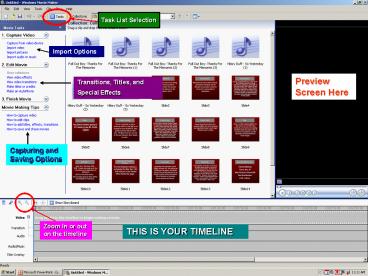
Task List Selection
Import Options
Preview Screen Here
Transitions, Titles, and Special Effects
Capturing and Saving Options
Zoom In or out on the timeline
THIS IS YOUR TIMELINE
2
Transitions
3
Film Effects
4
(No Transcript)
5
Adding Credits
6
Still Graphics
7
Always label your daily clips
8
Scene / or music cut clip button.
Drag music from the desktop or other folders to
your collection box to add music. Music can be
cut into clips just like video.
9
SAVING THE MOVIE STEP 1
10
SAVING THE MOVIE STEP 2
11
Label with your title and block Ex Block 2-
Red Riding Hood
SAVING THE MOVIE STEP 3
Always select to save your file to the desktop.
Move it to another folder later.
12
If your movie is for a class project, always save
as Best Quality
If your video is for a web posting, be sure to
select Best fit to file size 10 mb or smaller
SAVING YOUR MOVIE FINAL STEP
Recommended

